
Overview
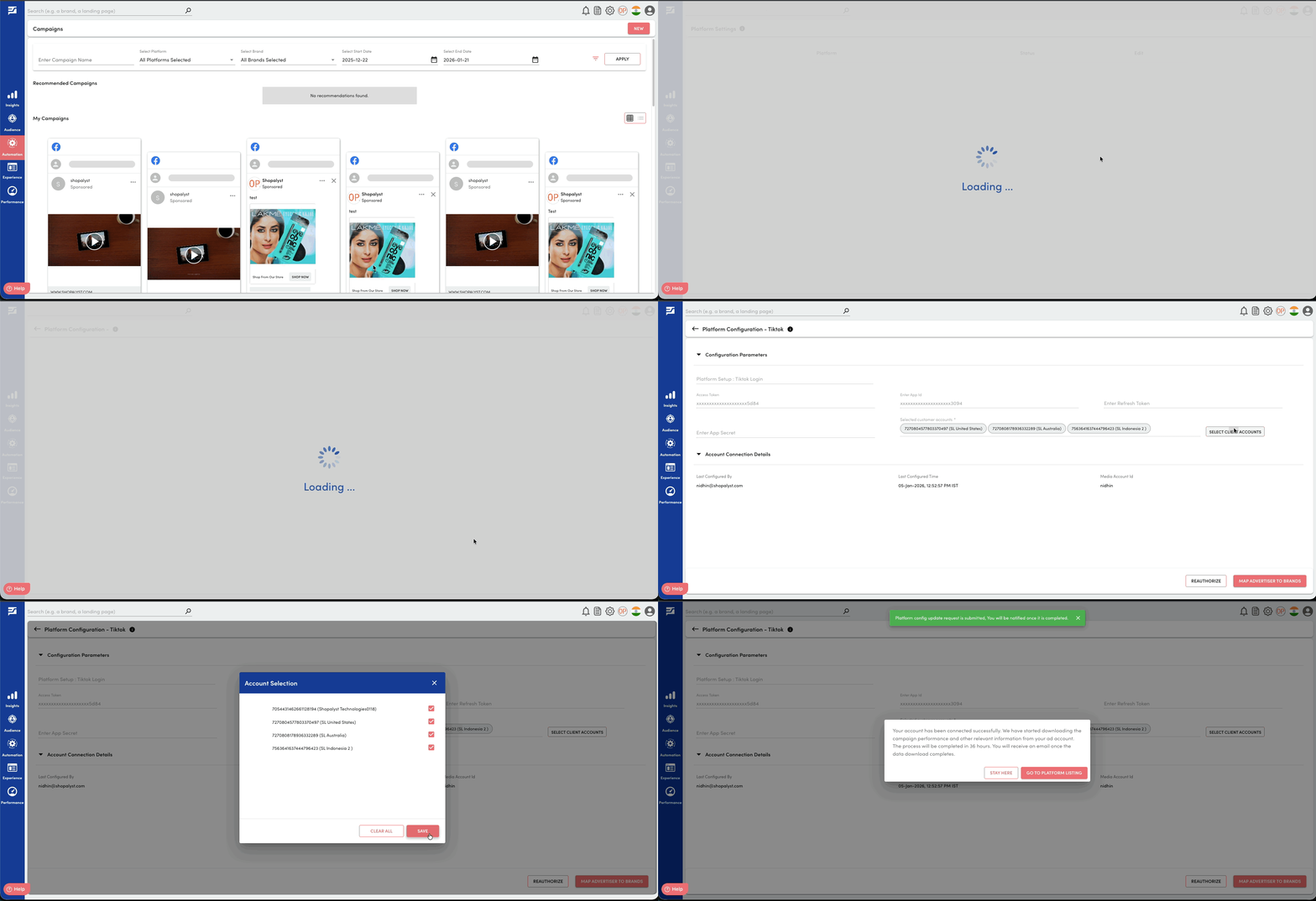
We have extended the ability to select client ad accounts on the Platform Settings page to TikTok. This enhancement allows users to control which TikTok ad accounts are used for automation and data visibility within the application.
What’s New
- View all TikTok ad accounts accessible through the connected TikTok configuration
- Select a subset of ad accounts to enable automation features
- Limit the data and campaigns visible in the application to only the selected accounts
- Configure ad account selection:
- During the initial platform connection step, or
- Any time later from the Platform Settings page while the platform is connected
Benefits
- Greater control over TikTok account integration
- Reduced clutter by limiting data to only relevant ad accounts
- Improved security and governance by restricting automation scope
- Easier management when working with multiple TikTok ad accounts
Getting Started
- Navigate to Platform Settings
- Click on Select Client Accounts and review the list of accessible TikTok ad accounts
- Select the accounts you want to enable for automation
- Save changes to apply the updated scope
- If you are connecting Tiktok for the first time, proceed with the connection process. Once the connection is successful, you will be redirected to the account selection page automatically
To know more about connecting Tiktok Ads account to Shopalyst Discovery Commerce, refer the following articles:
- Guide to connect your Ad platform account with Shopalyst Advertising Automation
- Delegate TikTok access