
Overview
We have introduced support for agentic AI–generated summaries in report emails, allowing users to include concise, contextual insights alongside their performance reports.
This feature is currently supported for:
- Basic Performance Reports
- Full Funnel Marketing Reports
The content of the summary is dynamically generated based on the selected summary type.
Summary Types Supported
- Executive – High-level overview focused on key outcomes and impact
- Operational – Day-to-day performance and execution-focused insights
- Data Insights – Analytical highlights derived from performance trends
- Outlier – Identification of anomalies, spikes, or unusual patterns
- Custom – User-defined prompt passed to the LLM agent for tailored summaries
Benefits
- Faster consumption of key insights directly from report emails
- Tailored summaries for different stakeholders and reporting needs
- Reduced manual analysis and interpretation effort
- Flexible customization through user-defined prompts
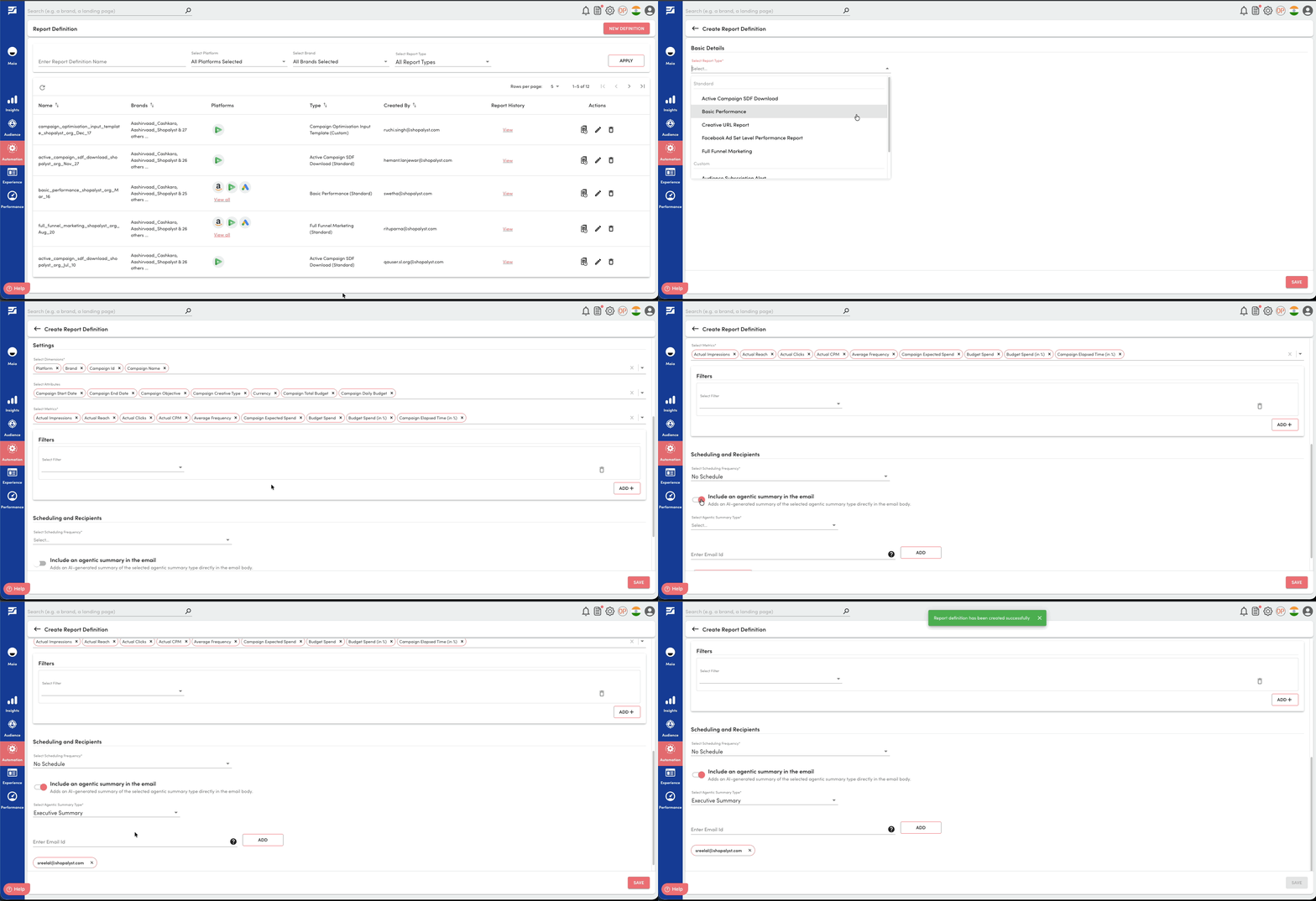
Getting Started
- Navigate to the Report Definition create / update page
- Enable “Include an agentic summary in the email”
- Select a Summary Type
- If Custom is selected, provide a custom prompt for the LLM agent
- Save changes
- Submit a new report generation request
- Once generated, the report email will include the AI-generated summary along with the report
Know More
To know more about Automation Reports, refer the following guides: