
Overview
With the latest release on Discovery Commerce Cloud, we have added support for creating TikTok Lead Generation campaigns through media plan uploads, enabling advertisers to automate lead-focused campaign setup directly from the input sheet.
Benefits
- Native lead capture using TikTok’s in-app forms reduces drop-offs
- High engagement formats help capture leads from discovery-driven audiences
- Optimized delivery using TikTok’s algorithms to reach users more likely to submit leads
Getting Started
To create a TikTok lead generation campaign:
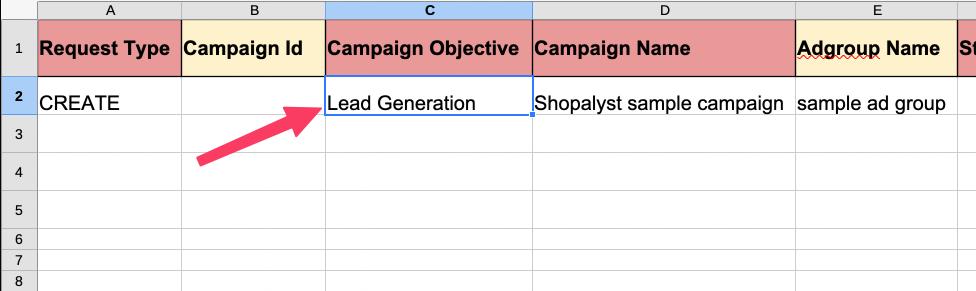
- Set the Campaign Objective to Lead Generation in the input sheet
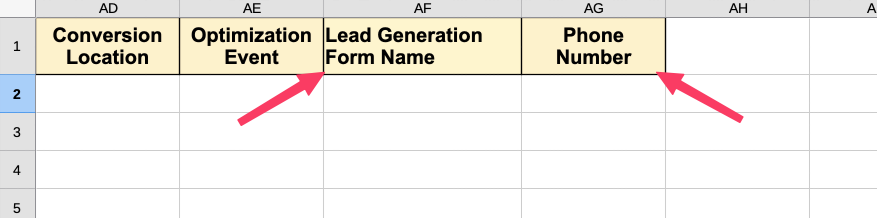
- Specify the Conversion Location as one of the following:
- Website
- Form
- Phone
- Based on the selected conversion location, provide the relevant details:
- Lead Generation Form Name (for Form-based conversions), or
- Phone Number (for Phone-based conversions)
- Proceed with the standard plan upload and campaign publish process
For more details on the columns required for these features and guidance on how to fill them, please refer the Instructions worksheet in the media plan input sheet.
Click here to know more about TikTok campaign setup.