
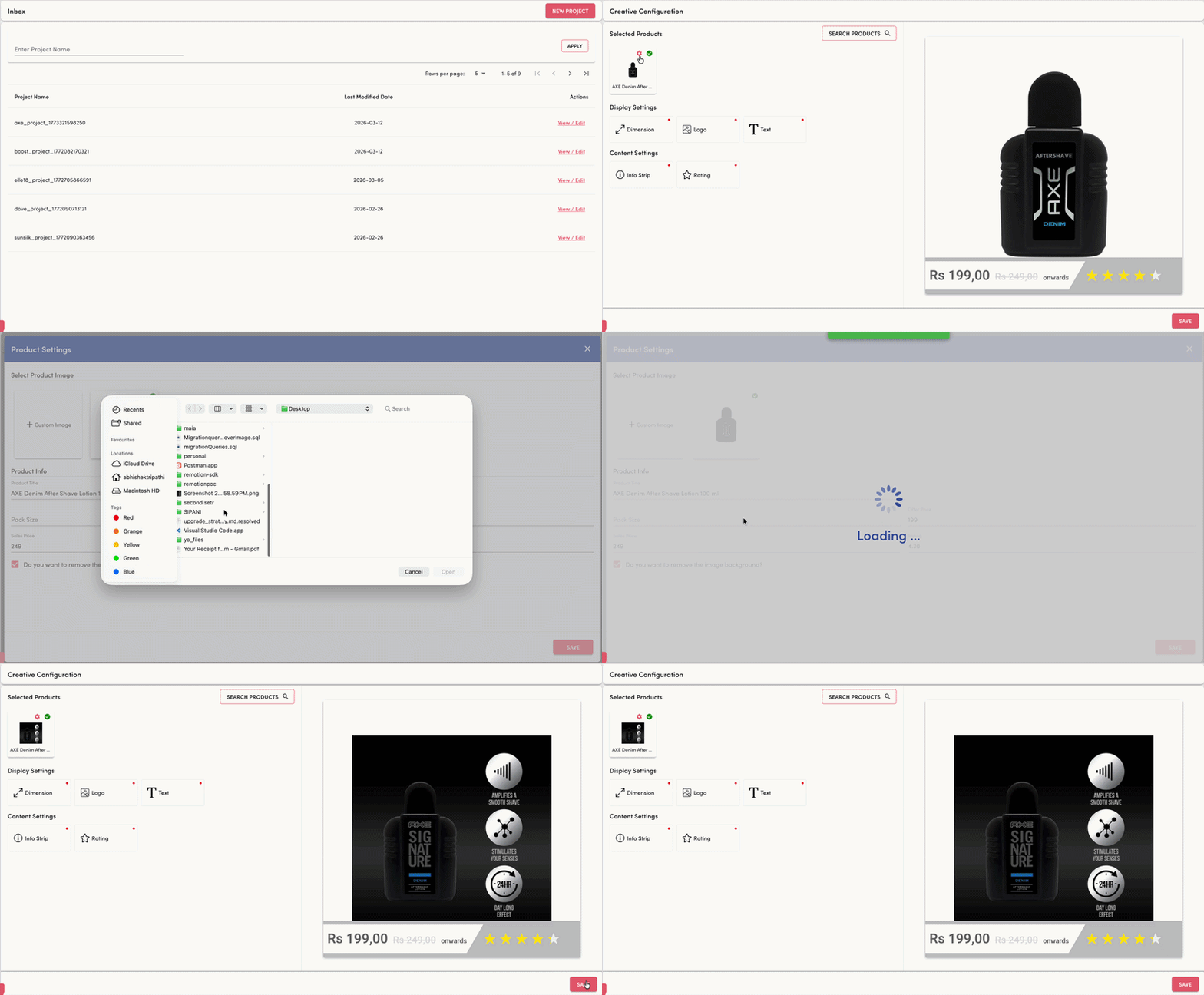
We have introduced the ability to upload custom product images during creative configuration, enabling greater flexibility and control over how products appear within generated creatives. Previously, creatives relied solely on default catalog product images pulled from our system. With this update, users can now upload or select alternate product visuals that better align with campaign objectives, branding needs, or platform requirements.
This enhancement allows creative teams to tailor product presentation while maintaining the automated creative generation workflow.
Key Updates
1. Custom Product Image Upload
Users can now upload a custom product image directly within the Product Settings panel.
This allows teams to:
Upload retouched or studio-quality product shots
Align product visuals with the creative concept
The uploaded image will be used as the primary product visual during creative generation.
2. Flexible Image Selection Options
The product image selection area now supports two options:
Custom Image Upload – Upload a new product image specifically for the creative.
Default Product Image – Continue using the product image available in the catalog.
This ensures users can easily switch between standard catalog images and campaign-specific visuals.
Key Benefits
1. Enables greater creative flexibility by allowing campaign-specific product imagery.
2. Reduces dependency on catalog images that may not fit creative requirements.
3. Improves visual consistency with automated background removal capabilities.
4. Allows quick customization of product information and pricing within creatives.
5. Enhances creative quality while maintaining the automated creative generation workflow.