
Overview
We have introduced a new feature in Shopalyst Discovery Commerce Cloud to provide real-time visibility into background tasks initiated by users.
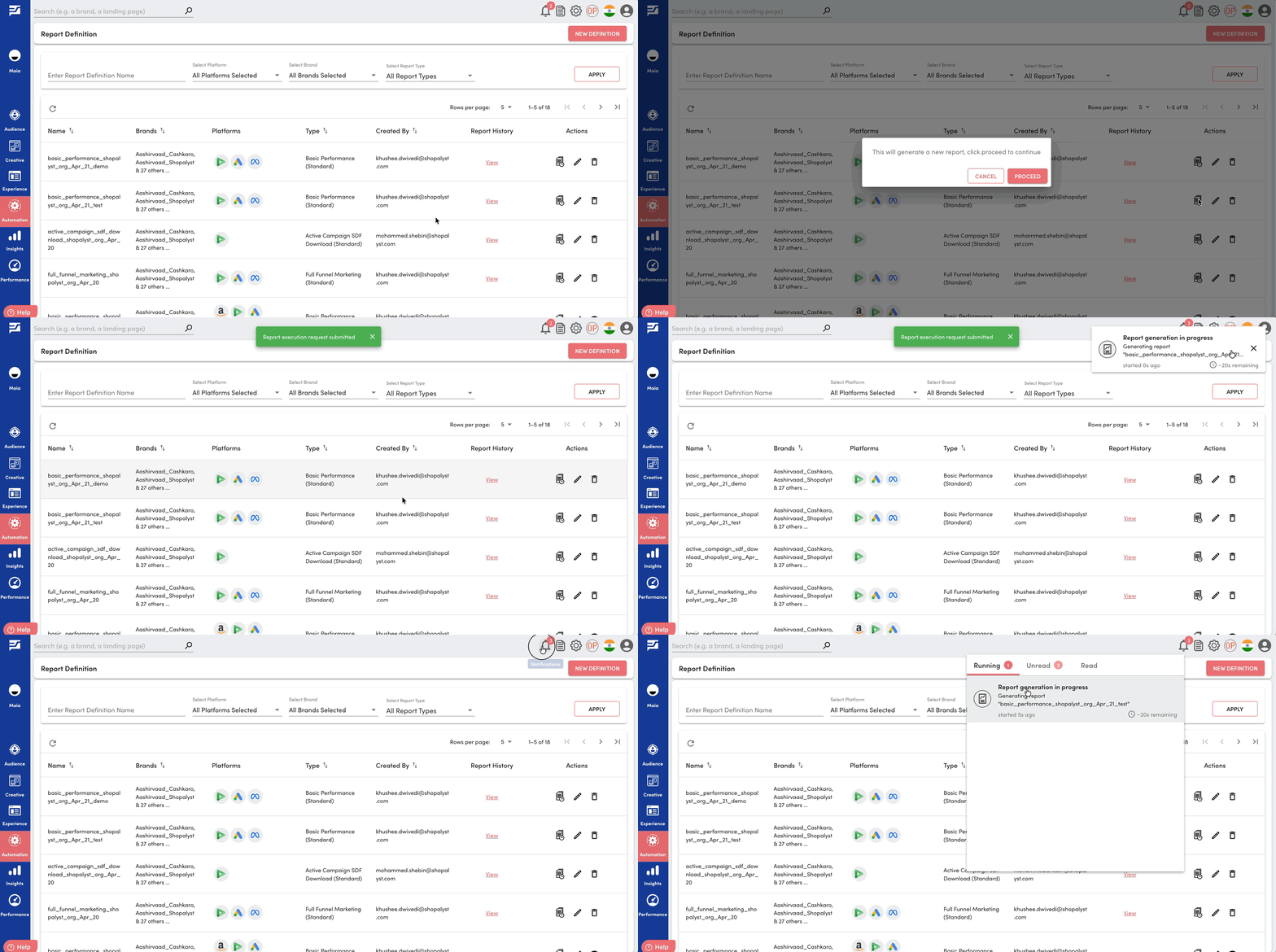
Users can now track ongoing activities such as media plan uploads, campaign publish, optimisation request and report runs directly within the application.
What’s New
- Running Tasks Tab in Notifications: A new Running tab has been added to the notifications window on the top right corner, displaying all background tasks currently in progress.
- Real-Time Task Details: Each task entry includes details related to the task, its start time and estimated time remaining.
- User-Specific Visibility: Running tasks are visible only to the user who initiated the request, ensuring a personalized and relevant view.
Benefits
- Improved transparency into long-running operations
- Better tracking of task progress without needing to wait or refresh
- Enhanced user experience with clear visibility into ongoing activities
Getting Started
- Trigger any background task (e.g. media plan upload, report run)
- Open the Notifications window on the top right corner by clicking on the bell icon
- Navigate to the “Running” tab
- View task details and estimated completion time