
Overview
We have released several new enhancements to Meta campaign creation via media plan uploads, giving advertisers greater flexibility in scheduling ad delivery, reusing existing social posts as creatives, and running Partnership (Branded Content) Ads directly from the media plan workflow.
1. Dayparting Support
- Dayparting allows advertisers to restrict ad delivery to specific hours and days of the week.
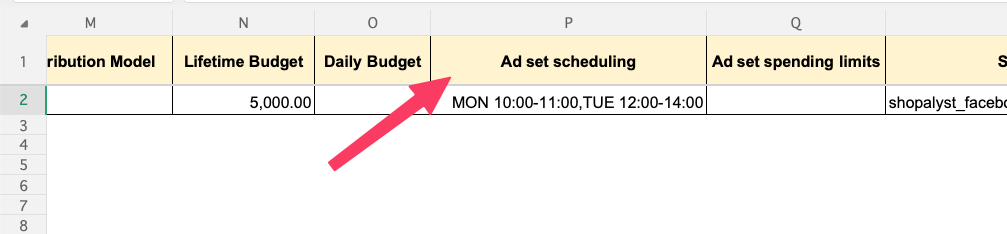
- Use the Ad set scheduling column in the input sheet to configure delivery schedules
- Schedule ad sets using specific time slots such as: MON 09:00-11:00 or TUE 14:00-16:30
Important Notes
- Daypart scheduling is supported only when using a Lifetime Budget
- Advantage+ Campaign Budget (CBO) must be disabled
- Media plan upload will fail if these requirements are not met
2. Facebook and Instagram Posts as Ad Creatives
- You can now create ads using existing Facebook or Instagram posts instead of uploading image or video assets.
- Set the Creative Type column to:
- FB Post to use an existing Facebook post
- IG Post to use an existing Instagram post
- Configure creatives using the columns:
- Facebook Post (Post ID or URL) or
- Instagram Post (Post URL, shortcode, or media ID)
- Leave the Creative column empty when using post-based creatives
Important Notes
- Use exactly one creative source per row
- Providing multiple creative sources in the same row will result in upload failure
3. Partnership Ads Support
- Partnership Ads (formerly Branded Content Ads) allow brands to sponsor and promote creator content directly through Meta.
- Set the Creative Type column to:
- FB Partnership to sponsor a creator's Facebook branded-content post
- IG Partnership to sponsor a creator's Instagram branded-content post
- When using FB Partnership, provide the post reference in the Facebook Post column
- When using IG Partnership, provide the post reference in the Instagram Post column
- For both Facebook and Instagram partnership ads, users can provide:
- Partnership Ad Code
- Permalink URL
- Post / Media ID
- Leave the Creative column empty when using partnership ads
Prerequisites for FB Partnership Ads
- Select the brand's Facebook Page during upload
- The post must appear in Meta's advertisable partnership posts for the selected sponsor page
Prerequisites for IG Partnership Ads
- The brand's Facebook Page must have a linked Instagram account
- The creator post must be returned by Meta's branded content advertisable media validation for the selected Instagram account
Important Notes
- If the post is not partnership-eligible or required permissions are not available, the upload will fail with the same post-validation errors as regular post-based creatives

Campaign Preview Support
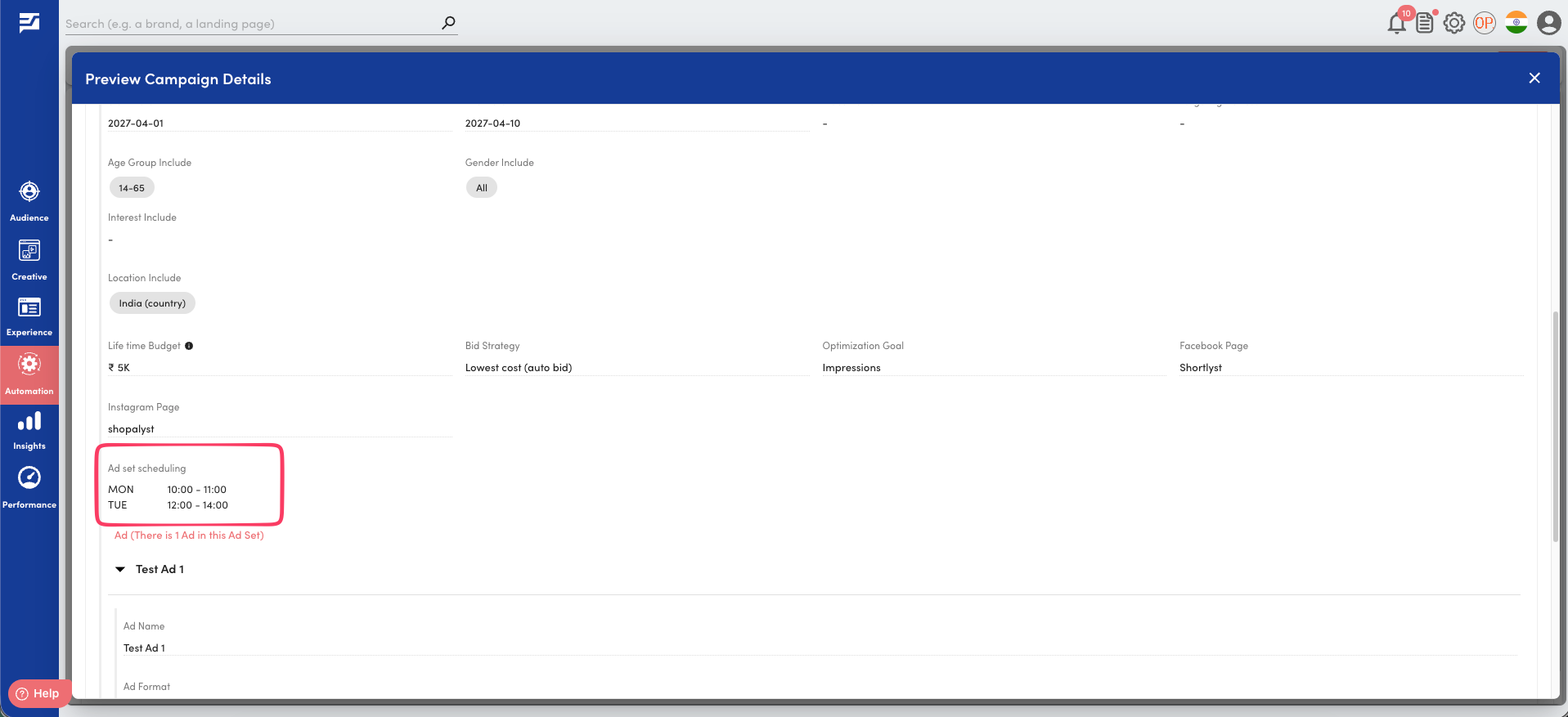
The campaign preview page has been enhanced to display the configuration of the newly introduced features, making it easier to validate campaign setup before publishing.
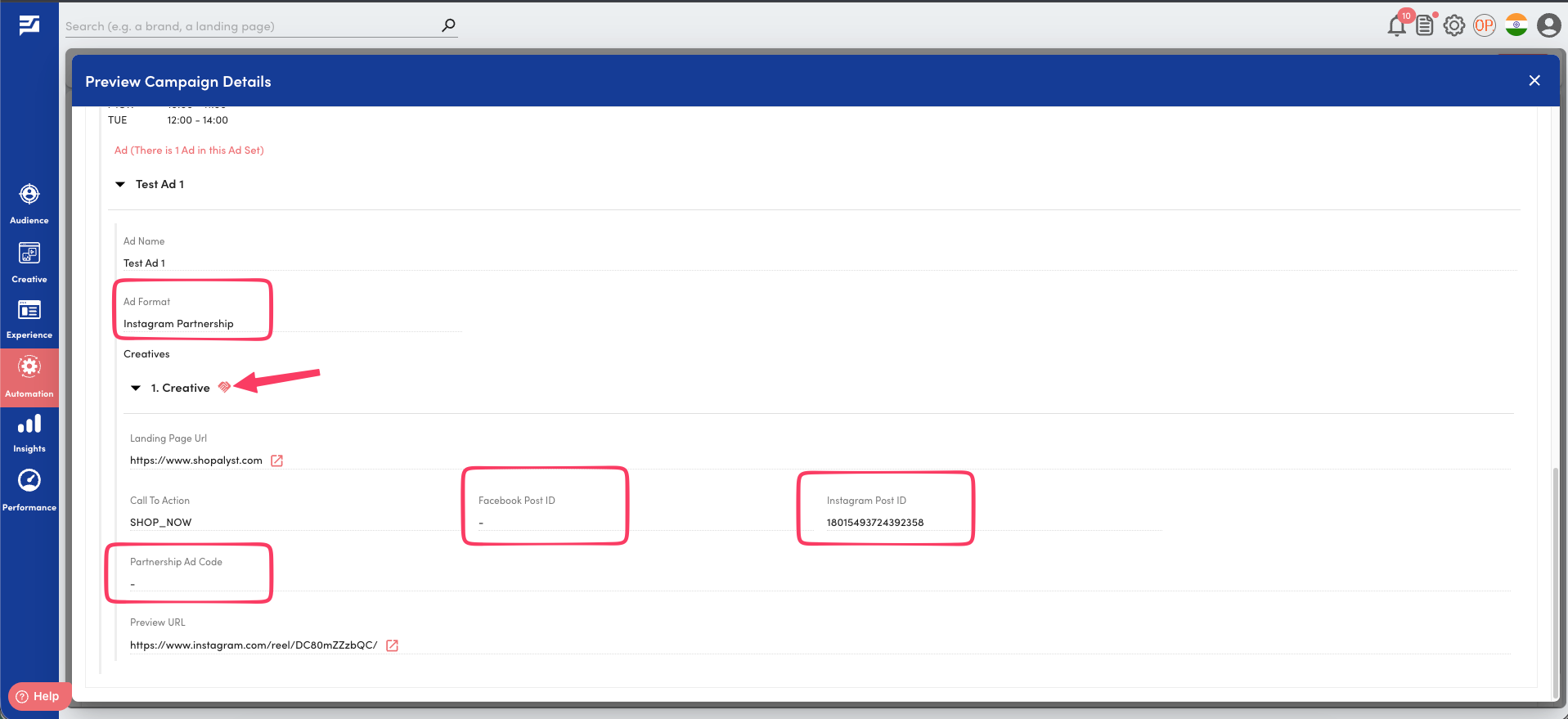
The following fields are now displayed on the preview page:
- Ad Set Scheduling
- Ad Format
- Facebook Post ID
- Instagram Post ID
- Partnership Ad Code
For Partnership Ads, a dedicated partnership icon is also displayed alongside the creative header to help users easily identify branded content creatives
Benefits
- Greater campaign control by restricting delivery to specific days and hours
- Improved budget efficiency by focusing spend on high-performing time windows
- Reuse existing Facebook and Instagram posts as ad creatives without uploading separate assets
- Leverage existing engagement and social proof from published posts in paid campaigns
- Scale creator and influencer marketing initiatives through support for Partnership (Branded Content) Ads
- Reduce manual setup effort by configuring advanced Meta campaign features directly through media plan uploads
Getting Started
- Use the latest Meta media plan upload template
- Populate the relevant columns based on the feature being used:
- Ad set scheduling for Daypart Targeting
- Creative Type, Facebook Post, and Instagram Post for Post-based Creatives
- Creative Type, Facebook Post, and Instagram Post for Partnership Ads
- Review the campaign configuration on the Campaign Preview page
- Follow the standard upload and publish workflow
Know More
- For detailed instructions, supported formats, example values, prerequisites, and column-level guidance, refer to the Instructions worksheet included in the media plan upload template.
- To know more about Meta campaign setup via Automation Media Plan Uploads, refer our guide Meta campaign creation via bulk upload.