
Overview
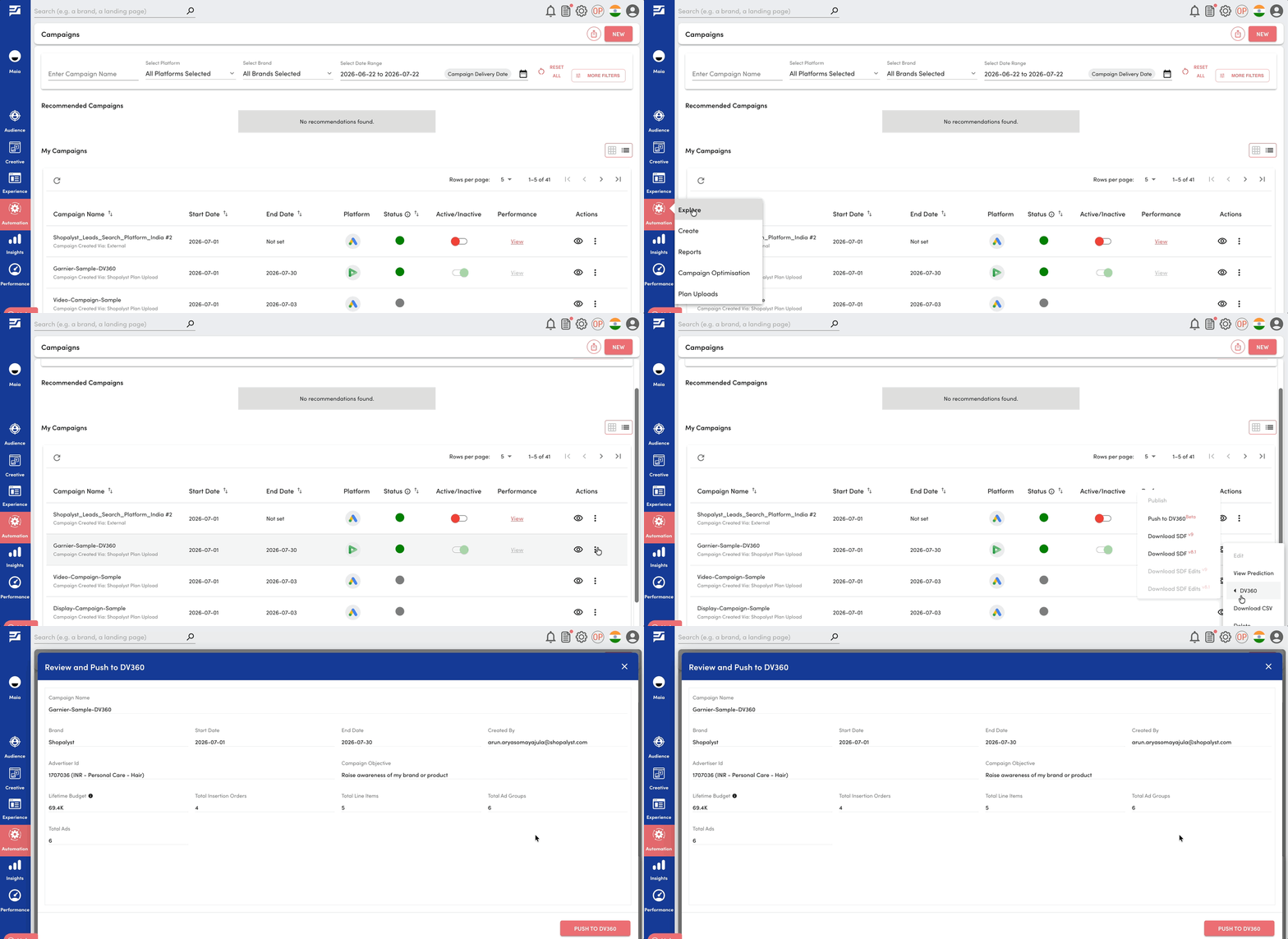
We have introduced a new review page as part of the Push (SDF) to DV360 workflow, giving users an opportunity to review the contents of the generated SDF before publishing it to their DV360 account.
This enhancement provides greater visibility into what will be published and helps users verify campaign details before initiating the upload.
What's New
- A new Review page is now displayed when users click Push to DV360 against a published campaign.
- The review page provides a summary of the campaign and the generated SDF, including number of Insertion Orders, Line Items, Ad Groups & Ads.
- Users can verify the campaign structure before proceeding with the SDF upload to DV360.
Benefits
- Improved visibility into the generated SDF contents
- Helps identify unexpected campaign structure before initiating the upload
- Provides a smoother and more transparent campaign SDF publish experience
Getting Started
- Publish your DV360 campaign using the standard workflow.
- Click Push to DV360 against the published campaign.
- Review the campaign summary and entity counts on the Review page.
- Confirm the details and proceed with publishing the SDF to your DV360 account
Know More
Click here to know more about DV360 bulk campaign upload