
Overview
We have introduced several enhancements to Google Ads video campaign creation via the standard media plan upload template, adding support for additional video campaign types, CPV bidding strategies, and various improvements for a smoother campaign setup experience.
1. New Video Campaign Subtypes
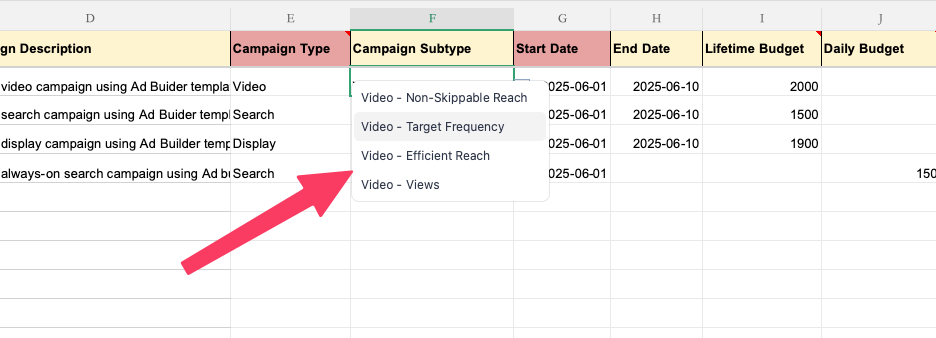
- Added support for the following video campaign subtypes:
- Video - Views
- Video - Non-Skippable Reach
- Video - Efficient Reach
- Existing support for Video - Target Frequency continues to be available
2. CPV Bid Strategy Support
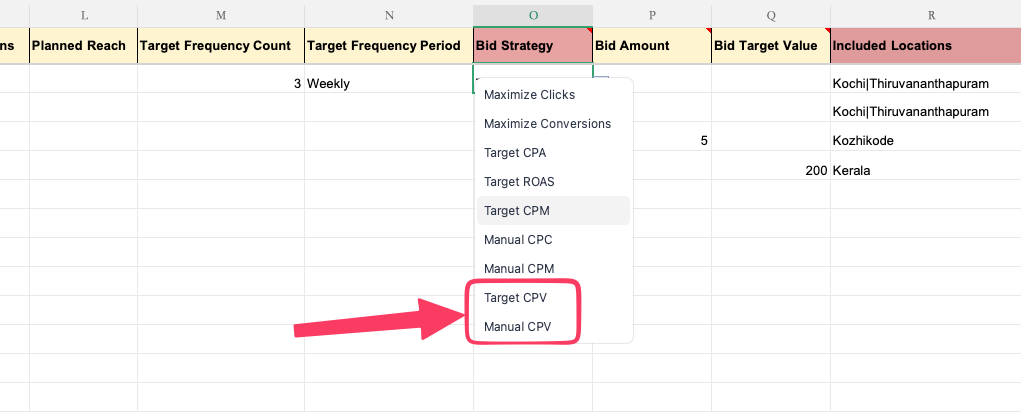
- Additional bidding strategies are now supported for Google Ads video campaigns:
- Manual CPV
- Target CPV
Benefits
- Create a wider range of Google Ads video campaigns directly through media plan uploads
- Configure CPV bidding strategies without manual intervention
- Improved compatibility with Google Ads Editor's latest bulk upload format
Getting Started
- Use the latest Standard / Google Ads Editor media plan upload template.
- Configure the required video campaign subtype and CPV bid strategy as applicable.
- Submit the media plan upload request and follow the standard campaign creation workflow.
- Download the generated Google Ads Editor CSV and verify the exported campaign configuration before importing it into Google Ads Editor.
Know More
- For detailed instructions, supported formats, example values, prerequisites, and column-level guidance, refer the Instructions worksheet included in the media plan upload template.
- To know more about Google Ads campaign setup via Automation Media Plan Uploads, refer our guide Google Ads Campaign Creation via bulk upload.