
Overview
We have added support for DV360 SDF v10.1 downloads for campaigns created using the standard media plan upload templates.
This enhancement aligns SDF generation with the latest DV360 specifications while maintaining compatibility with existing workflows.
What's New
- Users can now download campaign SDFs in DV360 SDF v10.1 format.
- Minor updates have been made to the Ad Group SDF and Ad SDF files to align with the latest DV360 SDF structure, including:
- Trueview Ad Source and Trueview Creative Assignments in the Ad Group SDF
- Parent Creative ID in the Ad SDF
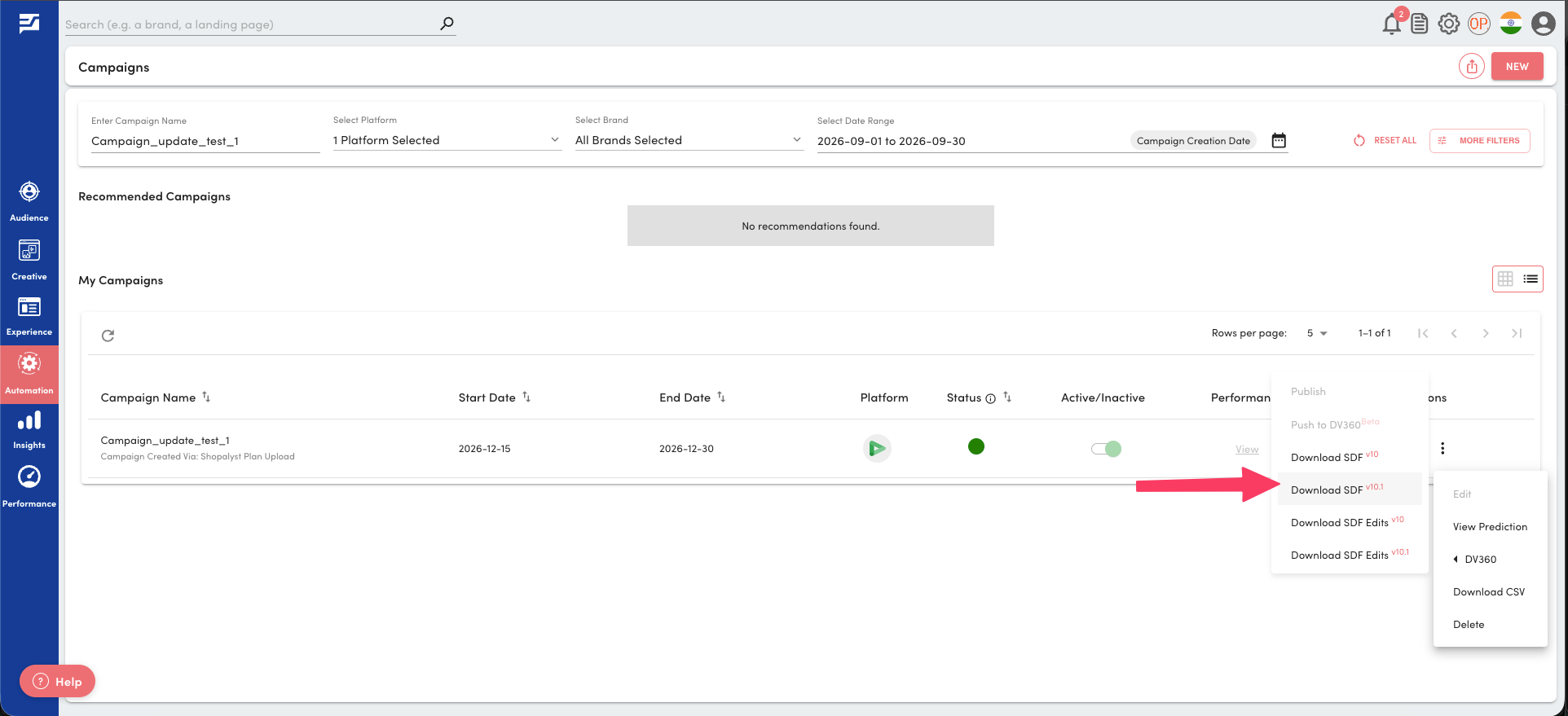
- Both SDF v10 and SDF v10.1 are available for download by default, allowing users to choose the version best suited to their workflow.
Important Notes
- No changes have been made to the existing media plan upload template.
- Customers using customised media plan upload workflows will continue to use their configured SDF version unless it is updated separately.
Getting Started
- Fill in the media plan input sheet as needed. Refer to the Instructions worksheet for allowed values and formatting details.
- Create your DV360 campaign as usual using Plan Uploads and publish it.
- Download the generated SDF and choose either SDF v10 or SDF v10.1 based on your deployment requirements.
Additional Information
If you require compatibility with a different SDF version, please reach out to our support team for assistance. This ensures that your workflows remain flexible while always staying aligned with Google’s updates.
Click here to learn more about working with SDF files and DV360 campaigns