
Overview
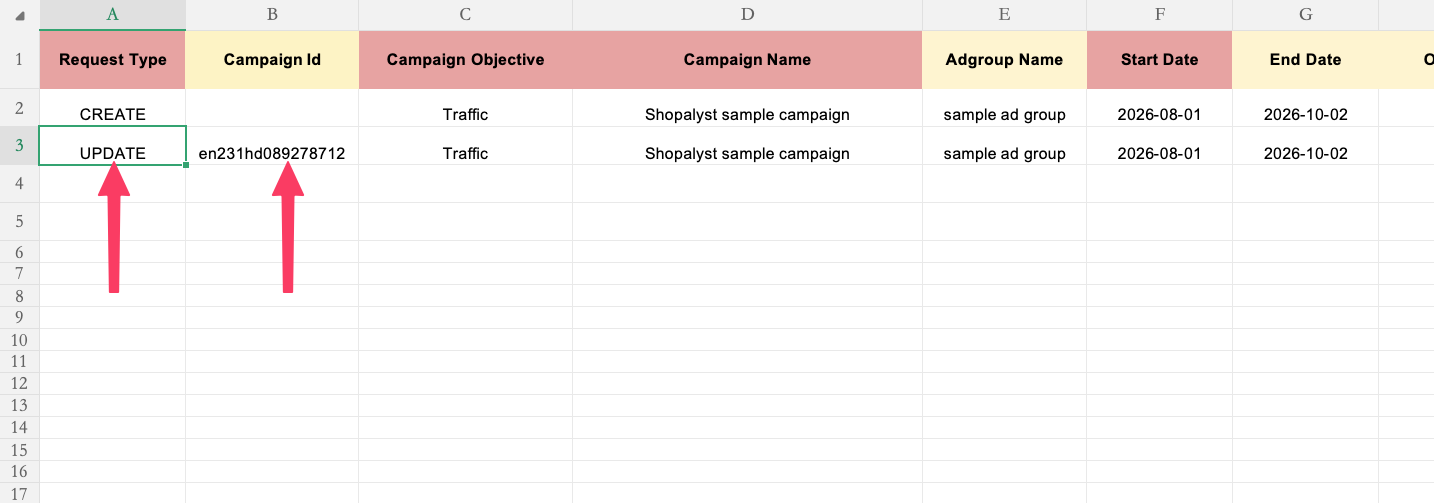
You can now update existing TikTok campaigns through the media plan upload workflow by providing the campaign's ID in the input file.
This lets advertisers add new ad groups or ads to a live TikTok campaign without recreating it, while keeping the same Plan Upload process used for campaign creation.
What's New
- Update existing TikTok campaigns from the standard media plan upload template.
- Set Request Type to
UPDATEand enter the campaign to update in Campaign Id. - Campaign Idaccepts either:
- the Shopalyst campaign ID, or
- the TikTok Ads Manager campaign ID (numeric)
- The system maps a TikTok campaign ID to the matching Signal campaign automatically.
- For
UPDATErows, Campaign Name and Campaign Objective are optional. Values already stored on the campaign are reused when those columns are left blank.
Important Notes
- Campaign Id is mandatory when Request Type is
UPDATE. Leaving it blank will fail media plan validation. - The campaign must already exist in Signal. If the ID cannot be resolved, the upload fails with a campaign-not-found error.
- Use
CREATE(and leave Campaign Id empty) when you are creating a new campaign. - Existing published campaigns are not deleted during an update.
- New ad groups are created when the Adgroup Name does not already exist on the campaign. Matching ad group names reuse the existing ad group.
- Duplicate ads with the same name under an existing ad group are not allowed.
- Custom targeting, budget, and CBO rules continue to apply on update, the same as on create.
Getting Started
- Use the latest TikTok media plan upload template.
- On each row that should update an existing campaign:
- Set Request Type to
UPDATE - Enter the Campaign Id (Signal campaign ID or TikTok campaign ID)
- Set Request Type to
- Add or update ad group and ad details as required. Campaign name and objective can be left blank.
- Upload the sheet from Automation > Plan Uploads and submit as usual.
- Review the campaign on the Plan Upload screen, then publish to apply the changes on TikTok.
Additional Information
For column-level guidance, allowed values, and formatting, refer to the Instructions worksheet in the media plan upload template.
To know more about TikTok campaign setup via Automation Media Plan Uploads, refer to our guide  TikTok Campaign Creation via bulk upload.